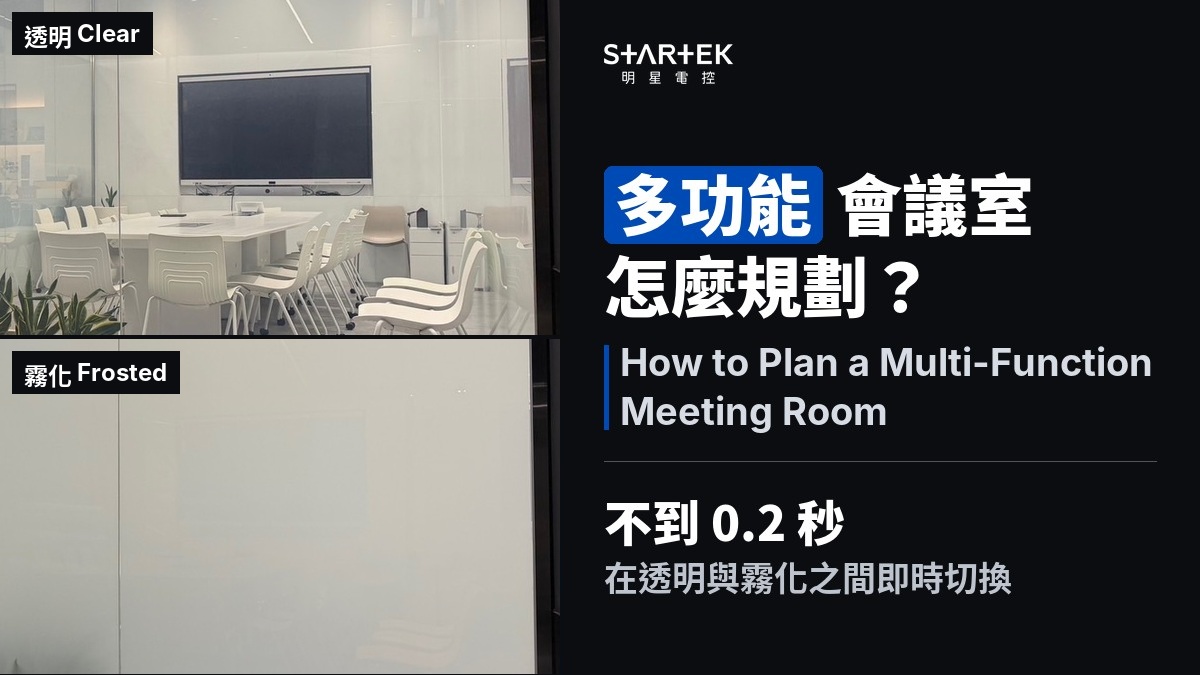
How to Plan a Multi-Function Meeting Room: Switchable Glass for Open and Private Modes
Today's office meeting rooms do more than host meetings — presentations, interviews, video calls, client showcases, and even quiet-focus work all happen in the same room. The challenge for designers: how to let one space shift freely between open and private, without curtains, movable partitions, or manual adjustments. LUXUO's 2026 interior design trends (2026-01-13) list "multi-functional adaptable spaces" and "flexible partitions" among the eight key directions. STARTEK is a Taiwan-based PDLC switchable glass specialist that helps designers achieve exactly this.
Key Facts
- PDLC switchable glass switches between clear and frosted in under 0.2 seconds (applies to: all STARTEK PDLC switchable glass)
- Each glass pane can be independently controlled, with dedicated transformers and remotes per zone
- One STARTEK 100 W transformer drives approximately 12 m² of switchable glass
- One remote per zone, paired with all transformers in that zone
- Frosted glass can serve as a basic projection surface, but brightness is only about 50–60% of a proper projection screen
- Power consumption: approximately 5 W/m²; frosted (power-off) state uses no electricity
- STARTEK laminated switchable glass: 5-year standard warranty (included), extendable to 10 years
One Room, Multiple Modes
A multi-function meeting room is not about buying more equipment — it is about the space itself being able to change state:
- Open mode: glass is transparent. People in the corridor can see whether the room is occupied and available. The office retains its open, connected feel.
- Privacy mode: glass is frosted. Interviews, HR meetings, or confidential briefings stay shielded from view.
- Display mode: some panes transparent, others frosted. Show what you want to show; conceal the rest.
PDLC switchable glass transitions in under 0.2 seconds — no waiting, no pulling, no angle adjustment. One press of the remote, and the state changes.
Zone Control: Each Pane Independent
A multi-function meeting room typically has more than one glass surface. Each surface — or each pane — can be set up as an independent control zone:
- Each pane connects to its own transformer circuit, so one wall can be frosted while the others remain clear.
- One 100 W transformer drives approximately 12 m² of switchable glass. A 9 m² wall takes one 100 W unit; a 13 m² wall takes one 200 W unit. Above 12 m², use one larger unit (200 W for about 24 m², 300 W for about 36 m²) instead of stacking 100 W units.
- One remote per zone, paired with all transformers in that zone. A meeting room with three independent zones gets three remotes. Zones can also be integrated into a smart-home system for app or schedule control.
The benefit of zoning is flexibility: instead of all-clear or all-frosted, you choose which surfaces to switch based on what the room is doing right now.
Can You Project onto Frosted Glass?
When PDLC glass is frosted, it presents a uniform white surface that can serve as a basic projection surface — aim a projector at the frosted glass, and the image is visible from both sides.
One important limitation: projection brightness on frosted glass is roughly 50–60% of a proper projection screen. PDLC scatters light in all directions when frosted, so not all projected light reflects back toward the viewer — some passes through to the other side.
Suitable for: quick internal sharing, corridor-facing displays, impromptu briefings. Not suitable for: formal client presentations, high-brightness needs, or extended viewing. If the room needs regular projection, pair the switchable glass with a dedicated screen or large display rather than relying on the glass as a screen replacement.
Design Planning Checklist
When specifying switchable glass for a multi-function meeting room, address these points during the design phase:
1. Zone logic: which surfaces need independent control? The corridor-facing wall and the executive-office-facing wall may need different states simultaneously.
2. Transformer placement: at least one transformer per zone, housed in a ceiling access panel. Mark the access panel location on the design drawings.
3. 110V outlet: each transformer requires a dedicated 110V outlet, recessed in the ceiling.
4. Lighting: specify linear fixtures or indirect lighting. Avoid large panel lights facing the glass directly — strong, broad light sources create glare and a haze effect on the glass surface, reducing transparency even when the glass is powered on.
5. Object clearance: objects behind the glass (whiteboards, screens, cabinetry) should be at least 10 cm away from the glass surface for effective privacy when frosted.
FAQ
Q1: Can switchable glass in a meeting room be controlled zone by zone?
Yes. Each pane or wall section can be an independent zone with its own transformer and remote, switching independently of the others.
Q2: Can you project onto frosted switchable glass?
Yes, for basic projection — but brightness is only about 50–60% of a proper screen. It works for quick sharing or corridor displays, not as a replacement for a dedicated projection screen.
Q3: How many transformers does one meeting room need?
It depends on the switchable glass area in each zone. One 100 W transformer covers approximately 12 m². Size each zone separately. For example, three zones of 9 m², 13 m², and 6 m² take a 100 W, a 200 W, and a 100 W unit — three transformers in total.
Q4: Can switchable glass connect to a smart-home system?
Yes. Switchable glass can be scheduled through smart-home platforms (e.g., Aqara): auto-frost after hours, auto-clear in the morning, or remote-control via phone.
Q5: How much power does switchable glass use in a meeting room?
PDLC switchable glass draws approximately 5 W/m². The frosted state uses no power. Scheduling power-off during unoccupied hours further reduces energy use.
Planning switchable glass for a multi-function meeting room?
Related Articles
Latest Articles
-
How Is Retrofit PDLC Smart Glass Installed? The Process from Survey to Handover
Smart Glass Revealed -
PDLC Smart Glass FAQ: 26 Questions Answered
Smart Glass Revealed


